|
|
Page created: |
|
|
Page created: |
| Netbooks |
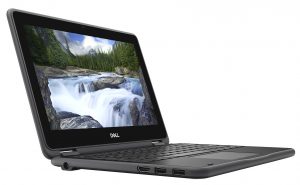
A Dell Latitude 3190
|
Many people began their computing and interneting experience at home on a netbook; a small, lightweight and generally cheaper version of a laptop; you might have fond memories of using such devices. They gained "popularity" through the Windows XP and Vista era, with the latter's Basic offering seemingly being ideal, along with Windows 7 Basic after that. This wasn't my early experience of them though. As a computer technician I would often get called upon to "speed up" such devices, only to have to (often) explain to the owner that "sorry, but your device only has 1GB of RAM, this isn't enough, and it can't be upgraded." With no upgrade path and lacking sufficient RAM from new, I considered these devices to be a con, mis-sold to an unwitting public. Fast forward to
Ultimately, I like netbooks for being low powered (~45W) and in the case of the Dell, and Lenovo I used to have, they are fanless and thus silent. The small screen size, however, make these less than ideal for full-time use in my experience, although I have tried - I am convinced that they can help curb distractions due to the small screen and low power restricting the ability/tendency to "multi-task". - - - - - - - - - - Notes: After the Linux mint install: In Mouse and Touchpad, enable 'Tap touchpad to click'. Change Power Manager settings to Shutdown with the power button Connect to Wi-Fi and click the shield in the taskbar to check for system updates (there'll be a lot the first time around). I prefer a dark theme to match the laptop's aesthetic and provide a calmer feel that is more suited to using the device in a dark environment, rather than a bright vibrant workspace. Download and install your preferred software from the Software Manager: - Firefox and
LibreOffice are included.
- Audacious music player (it can be
set up with a Winamp-style theme) Uninstall what you don't use; this has the benefit of reducing the number updates but care must be taken to not remove things that are actually required. - - - - - 2023: As of this year I had a Lenovo IdeaPad Flex 10 in regular use, an Advent 4211-B for running the Webcam feature (I still do but I have more recently set up a Raspberry Pi for this), and a HP Pavilion Touchsmart 10-E that I didn't do anything with beyond installing ZorinOS on.
The build-quality of the Lenovo was poor and the plastics around the hinge started to break, the track pad temperamental, and the charge socket was already broken when I acquired the device and my repair wasn't wholly successful, and the battery no longer as good as it was, so I sold it on. It had been handy as a small laptop though, especially with its touchscreen. The HP Pavilion became faulty and wouldn't boot. These devices I had found individually on ebay at cheap prices due to them having various issues.
|



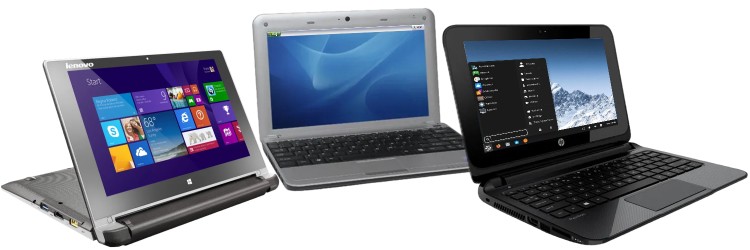
 - Originally with Windows 8 but now with Windows 10
 - Windows XP
 - I have replaced the original hard drive with an SSD and
installed Zorin OS Lite on it due to this netbook
having a fixed 2GB of RAM. It was sold to me with Windows 10
on it and I was lead to believe the previous owner had simply
forgotten their password to log in. However, upon receiving it
I realised the keyboard was non-UK and also faulty (leading to
the password being mistyped). I tried repairing it with the
view of putting some stickers on the keys, but I was
unsuccessful and had to source a replacement top panel. Sadly
the battery also holds no charge although replacements are
available. Like the Lenovo, it has no cooling fan.
- I have replaced the original hard drive with an SSD and
installed Zorin OS Lite on it due to this netbook
having a fixed 2GB of RAM. It was sold to me with Windows 10
on it and I was lead to believe the previous owner had simply
forgotten their password to log in. However, upon receiving it
I realised the keyboard was non-UK and also faulty (leading to
the password being mistyped). I tried repairing it with the
view of putting some stickers on the keys, but I was
unsuccessful and had to source a replacement top panel. Sadly
the battery also holds no charge although replacements are
available. Like the Lenovo, it has no cooling fan.