|
|
BOINC Configuration... Depending on the system, I may change some settings: This page contains some guidance for various aspects of participating in the project - I'm no expert and the following largely serves as a reminder to myself, but perhaps others will find things useful.
Introduction: To participate in Einstein@home you will first need to ensure you have the necessary graphics drivers installed (AMD/Nvidia) if intending to use a graphics card to participate. Then download and install BOINC. During this process you will assign the Einstein project. There are settings that can be changed within BOINC itself, and also at einsteinathome.org > Account > Preferences > Project. Installing on Windows: This is the most straightforward in my experience for both installing graphics drivers and BOINC. In the case of Windows, I'm presently using only Windows 10, but for this or Windows 11, if it's a BOINC-only system (and not used for anything else) be aware that Windows 11 will generally be trying to download and install Windows Updates. If you're connected to the internet over Wi-Fi then I recommend setting Wi-Fi as a 'metered connection' and disabling Updates for this type. Installing on Linux: It's great to be avoiding Windows, but a Linux setup is usually going to be more involved. My Linux setups have been hit-or-miss, sometimes one distro setup goes ok, but then on another machine I run into problems. I'm still trying to figure out the best route here.
Linux Issues x2:
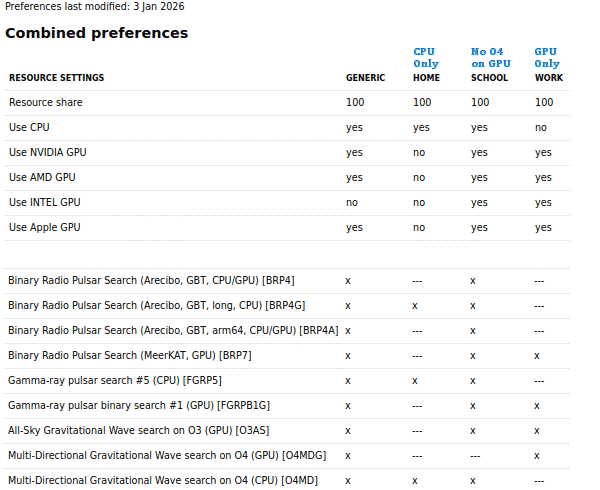
CPU & RAM Usage: If a computer only crunches on the CPU and is not used by anything else or at risk of overheating, I will likely have CPU usage set 100% (in BOINC > Options > Computing preferences). One also needs to consider if the CPU is Hyperthreading enabled since these are classed as CPU cores also, in this case set usage to 50%. If using a graphics card (GPU) to crunch then a CPU core will need to be left available to feed the GPU. Ideally you want maximum processing but not at the risk of bottle-necking, or starving the GPU of data. You need sufficient RAM for each work unit. I think 4GB is the minimum for processing two work units at a time. You can allow BOINC to make use of as much or as little RAM as you want; I allow up to 90% on a computer I don't use for anything else. Work Units: There are different work units made available for different CPUs and GPUs. Generally you can just let the system decide, however, it may be preferable, or possible to optimise things manually. Each computer is assigned to a Location (Generic, Home, Work, School). The user can tweak these Locations: einsteinathome.org > Account > Preferences > Project. And then set a computer to a specific Location so it follows the preferences set. Here is how I have mine set:
Network Usage: Once BOINC is set up and the first set of work units have been downloaded and begun I limit network usage to 100 KB/s.
|