|
Day 6, Here's another Moon for those of you who
don't want to read the lengthy waffle that follows (I don't
blame you):

It has been hanging on my kitchen wall since last Christmas,
but I renewed the batteries this week.
Einstein-Rosen Bridges
Hurdles
Regular followers will probably be aware that I am a
participant of the distributed science project
einstein@home.
Prior to this, and since 1999, I participated in the more widely
known SETI@home (now discontinued). These days I only participate during the winter
months since it consumes electricity which costs money, and the
heat generated by the computers can contribute to heating my
home. Since I have no interest in feeling like I'm living in an
old-people's home, with a computer in each room, it's actually
all just about adequate for my desired level of comfort.
Over the past few years I've developed this routine where,
week-by-week following the end of October, I go around
un-mothballing each computer. Since they're generally quite
old now and the electrical components of the power supplies,
motherboards, and graphics cards don't really appreciate being
left for so long without use (particularly if they've gotten a
bit damp and dusty), some things object (I had to swap a few
things round, including a motherboard and power supply, and then
a graphics card decided it wasn't going to play ball.)
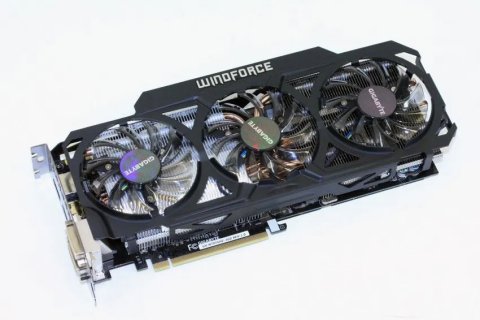
In addition to the
hardware issues, this time around I wanted to switch more things
over to running on Linux instead of Windows 10 which I had
mostly been using (my daily driver has been Linux for over a
year now).
As many people can attest, making the switch from Windows to
Linux can be a challenge for various reasons (there is both a
learning curve and compatibility issues with software, for
example.) Things have gotten better over the years and there's a
lot of help out there from both the traditional forums to more
latterly A.I.. Fundamentally, all that is required is the
necessary BOINC software and compatible graphics drivers for
systems that will be number-crunching on the GPU, all of which
are available for Linux.
I settled on Linux Mint xfce and set about getting the
install and setup process down to a tee so I could replicate the
procedure on each computer. However, just when I thought I'd got
my head around things I started getting a "Connection Error" on
the next machine:
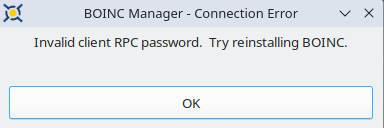
Invalid client RPC password. Try reinstalling BOINC.
After much too'ing-and-fro'ing with ChatGPT I'd
just about got around this, at least in a temporary fashion on
the one remaining computer that was presenting it...
In terminal:
cat /etc/boinc-client/gui_rpc_auth.cfg
Copy the passwordIn BOINC
(Advanced View):
File > Select computer
Host name: localhost
Password: [paste the copied password] |
|
(On one computer I have to
do this every time, but I have some more things to try.) |
But then since the 2nd December I started
getting upload failures for all of the competed work on each
computer; the uploads would get to 100% and then fail and be
stuck in the list, which in turn would prevent any further work
being received.
At first I thought this was a temporary issue
with the project (SETI@home used to get a lot of technical
issues). But after a day of it, and not seeing anything on the
project forums, or anything particular on the server status
page, I was starting to think the issue was more localised; but
my internet connection was working fine otherwise...
Earlier this year I changed my internet service
from broadband through a phoneline to connecting over the
mobile/cell-phone network (by tethering wirelessly with my
phone). I did this mainly for cost-saving purposes, but connection
speeds are actually faster, the only issue is the data allowance
is limited (that and the service tends to go down for a while
during thunderstorms). I had concerns my deal wouldn't have
enough data, and indeed last month I ran out for a couple of
days when a couple of my computers still on Windows 10 started
downloading updates as soon as they were switched on for the
first time (one key reason I was keen to switch to Linux).
Regarding the upload issue, ChatGPT suggested
aborting the uploads, promising this wouldn't result in a loss
of credit, but BOINC itself said otherwise. I went ahead
regardless on one machine and then successfully made a request
for new work... but then the downloads were failing in a similar
manner:
"transient HTTP error"
ChatGPT said this could indeed be due to my ISP
"dropping or interfering with BOINC’s HTTP transfers" and
suggested I try using a VPN, at least temporarily with a free
trial to confirm the suspicions.
(I used to have problems years ago with
SETI@home when I used a similar internet service that was
compressing all image files, which BOINC was trying to use for
data verification).
I looked into my options and then settled on
ProtonVPN because it includes a free basic VPN as part of a
standard free account, but would a Linux install go smoothly? Of
course not. For some reason (although probably because it was
too early in the morning and my brain still had the other
options floating around in it) I ended up trying to download,
install, and connect to NordVPN with my Proton
login details; only after a few failed attempts did I realise my
stupidity. Moron. Turning then to ProtonVPN's instructions
proper for a Linux install and I ran into problems (I'd had a
few with NordVPN but at least I'd got it installed!).
Having given up on that for the moment I
installed ProtonVPN on to one of my two Windows machine (by
simply downloading and installing the .exe, because, you know,
Windows) and... hurrah! BOINC worked again, confirming the
suspicions my ISP was now blocking the einstein@home transfers
(the buggers).
Because ProtonVPN specifically states it's for
one machine unless you pay a monthly fee I wondered how I might
get around this; could I install it on one machine and bridge
connections? (apparently no), could I install it on my phone and
then maybe any tethered devices would be using the VPN?
(apparently no), could I create multiple accounts with Proton?
(possibly) Or, uninstall and reinstall? (maybe) This was
beginning to sound like a hassle, but it turned out I needn't
have worried about this; I could install the VPN on more
than one machine, I would just have to connect to the internet
with one at a time... something I was doing anyway since I have
only one spare USB Wi-Fi dongle!
So for now I'm back up and crunching with my two
Windows machines and I just need to address the two that are on
Linux Mint... Ah, it's warm again in my office and bedroom...
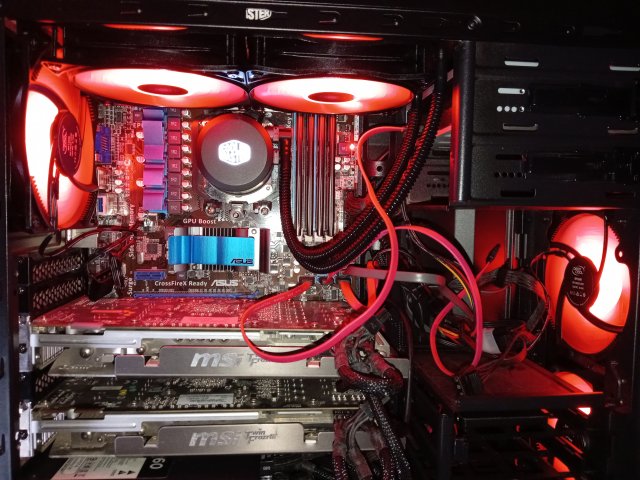
Please ignore the slightly untidy cables.
I don't know why my ISP suddenly started
blocking my einstein@home transfers; perhaps systems had
detected the increasing flow of such spurious data and
elected to block it. I'll look into contacting them, but first I
want to at least get ProtonVPN installed and running on Mint...
|